Network Security Home Network Security Home
HOME Software Store Products Online
Network Tools
Wireless
Network Tools
Security News Nsasoft
DHCP Explorer
  DhcpExplorer 1.1 Description
  File Size: 544 KB  Last update: 21/06/08
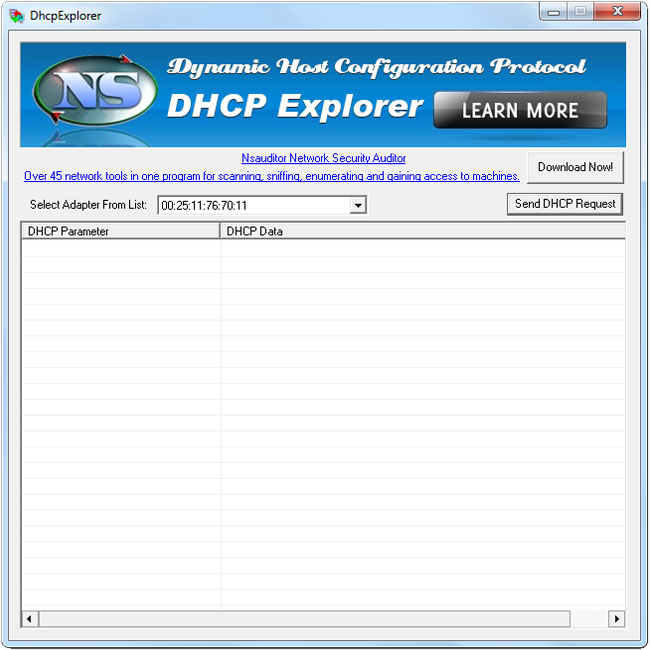
DhcpExplorer tool allows you to discover DHCP servers on your local subnet or LAN. This is useful for locating servers that are not supposed to be on your network ( rogue DHCP servers ) as well as checking the expected output of known servers. DHCP Explorer broadcasts on the local physical subnet to find available DHCP servers. The tool is designed with a user-friendly interface and is easy to use  
 
  OS: Windows2000,WinXP,Windows2003
  System Requirements:  DHCP enabled on network adapter
  License: Freeware 
  Last Changes: Updated dhcp client
  Pro version is available in Nsauditor
  Download
Screenshot
  Discover DHCP servers on network Nsauditor scan and monitor network for possible vulnerabilities
 
 
  Dynamic Host Configuration Protocol

Dynamic Host Configuration Protocol (DHCP) is a client-server networking protocol and uses the same two IANA assigned ports for BOOTP: 67/udp for the server side, and 68/udp for the client side. A DHCP server provides configuration parameters specific to the DHCP client host requesting, generally, information required by the client host to participate on an IP network. DHCP also provides a mechanism for allocation of IP addresses to client hosts. DHCP server is a useful tool that automates the assignment of IP addresses to hundreds of workstations in your network. The server maintains a pool of IP addresses that you use to create scopes. A DHCP scope is a collection of IP addresses and TCP/IP configuration parameters that are available for DHCP clients to lease. The server automatically allocates these IP addresses and related TCP/IP configuration settings to DHCP-enabled clients in the network. The DHCP service leases the IP addresses to clients for a period that you specify when you create a scope. A lease becomes inactive when it expires. Through the DHCP server, you can reserve specific IP addresses permanently for hardware devices that must have a static IP address (e.g., a DNS server). An advantage of using DHCP is that the service assigns addresses dynamically. The service returns addresses that are no longer in use to the IP address pool so that the server can reallocate them to other machines in the network. If not for this service, you would have to manually configure IP for new computers, keep track of IP addresses so that you could reassign addresses that clients aren't using, and reconfigure computers that you move from one subnet to another

Client Configuration Parameters
A DHCP server can provide optional configurations to the client. RFC 2132 defines DHCP options.

List of configurable options and their corresponding numbers:

                                 Data 
  Tag     Name                  Length  Meaning                              
  ---     ----                  ------  -------                              
   0      Pad                      0    None                                 
   1      Subnet Mask              4    Subnet Mask Value                    
   2      Time Offset              4    Time Offset in                       
                                        Seconds from UTC 
   3      Router                   N    N/4 Router addresses                 
   4      Time Server              N    N/4 Timeserver addresses             
   5      Name Server              N    N/4 IEN-116 Server addresses         
   6      Domain Server            N    N/4 DNS Server addresses             
   7      Log Server               N    N/4 Logging Server addresses         
   8      Quotes Server            N    N/4 Quotes Server addresses          
   9      LPR Server               N    N/4 Printer Server addresses         
  10      Impress Server           N    N/4 Impress Server addresses         
  11      RLP Server               N    N/4 RLP Server addresses             
  12      Hostname                 N    Hostname string                      
  13      Boot File Size           2    Size of boot file in 512 byte        
                                        chunks 
  14      Merit Dump File          N    Client to dump and name              
                                        the file to dump it to 
  15      Domain Name              N    The DNS domain name of the           
                                        client 
  16      Swap Server              N    Swap Server addeess                  
  17      Root Path                N    Path name for root disk              
  18      Extension File           N    Path name for more BOOTP info        
  19      Forward On/Off           1    Enable/Disable IP Forwarding         
  20      SrcRte On/Off            1    Enable/Disable Source Routing        
  21      Policy Filter            N    Routing Policy Filters               
  22      Max DG Assembly          2    Max Datagram Reassembly Size         
  23      Default IP TTL           1    Default IP Time to Live              
  24      MTU Timeout              4    Path MTU Aging Timeout               
  25      MTU Plateau              N    Path MTU  Plateau Table              
  26      MTU Interface            2    Interface MTU Size                   
  27      MTU Subnet               1    All Subnets are Local                
  28      Broadcast Address        4    Broadcast Address                    
  29      Mask Discovery           1    Perform Mask Discovery               
  30      Mask Supplier            1    Provide Mask to Others               
  31      Router Discovery         1    Perform Router Discovery             
  32      Router Request           4    Router Solicitation Address          
  33      Static Route             N    Static Routing Table                 
  34      Trailers                 1    Trailer Encapsulation                
  35      ARP Timeout              4    ARP Cache Timeout                    
  36      Ethernet                 1    Ethernet Encapsulation               
  37      Default TCP TTL          1    Default TCP Time to Live             
  38      Keepalive Time           4    TCP Keepalive Interval               
  39      Keepalive Data           1    TCP Keepalive Garbage                
  40      NIS Domain               N    NIS Domain Name                      
  41      NIS Servers              N    NIS Server Addresses                 
  42      NTP Servers              N    NTP Server Addresses                 
  43      Vendor Specific          N    Vendor Specific Information          
  44      NETBIOS Name Srv         N    NETBIOS Name Servers                 
  45      NETBIOS Dist Srv         N    NETBIOS Datagram Distribution        
  46      NETBIOS Node Type        1    NETBIOS Node Type                    
  47      NETBIOS Scope            N    NETBIOS Scope                        
  48      X Window Font            N    X Window Font Server                 
  49      X Window Manager         N    X Window Display Manager             
  50      Address Request          4    Requested IP Address                 
  51      Address Time             4    IP Address Lease Time                
  52      Overload                 1    Overload "sname" or "file"           
  53      DHCP Msg Type            1    DHCP Message Type                    
  54      DHCP Server Id           4    DHCP Server Identification           
  55      Parameter List           N    Parameter Request List               
  56      DHCP Message             N    DHCP Error Message                   
  57      DHCP Max Msg Size        2    DHCP Maximum Message Size            
  58      Renewal Time             4    DHCP Renewal (T1) Time               
  59      Rebinding Time           4    DHCP Rebinding (T2) Time             
  60      Class Id                 N    Class Identifier                     
  61      Client Id                N    Client Identifier                    
  62      Netware/IP Domain        N    Netware/IP Domain Name               
  63      Netware/IP Option        N    Netware/IP sub Options               
  64      NIS-Domain-Name          N    NIS+ v3 Client Domain Name           
  65      NIS-Server-Addr          N    NIS+ v3 Server Addresses             
  66      Server-Name              N    TFTP Server Name                     
  67      Bootfile-Name            N    Boot File Name                       
  68      Home-Agent-Addrs         N    Home Agent Addresses                 
  69      SMTP-Server              N    Simple Mail Server Addresses         
  70      POP3-Server              N    Post Office Server Addresses         
  71      NNTP-Server              N    Network News Server Addresses        
  72      WWW-Server               N    WWW Server Addresses                 
  73      Finger-Server            N    Finger Server Addresses              
  74      IRC-Server               N    Chat Server Addresses                
  75      StreetTalk-Server        N    StreetTalk Server Addresses          
  76      STDA-Server              N    ST Directory Assist. Addresses       
  77      User-Class               N    User Class Information               
  78      Directory Agent          N    directory agent information          
  79      Service Scope            N    service location agent scope         
  80      Rapid Commit             0    Rapid Commit                         
  81      Client FQDN              N    Fully Qualified Domain Name          
  82      Relay Agent Information  N    Relay Agent Information              
  83      iSNS                     N    Internet Storage Name Service        
  84      REMOVED/Unassigned                                                 
  85      NDS Servers              N    Novell Directory Services            
  86      NDS Tree Name            N    Novell Directory Services            
  87      NDS Context              N    Novell Directory Services            
  88      BCMCS Controller Domain Name list                                  
  89      BCMCS Controller IPv4 address option                               
  90      Authentication           N    Authentication                       
  91      REMOVED/Unassigned                                                 
  92      REMOVED/Unassigned                                                 
  93      Client System            N    Client System Architecture           
  94      Client NDI               N    Client Network Device Interface      
  95      LDAP                     N    Lightweight Directory Access Protocol
  96      REMOVED/Unassigned                                                 
  97      UUID/GUID                N    UUID/GUID-based Client Identifier    
  98      User-Auth                N    Open Group's User Authentication     
  99      Unassigned                                                         
  100     REMOVED/Unassigned                                                 
  101     REMOVED/Unassigned                                                 
  102-107 REMOVED/Unassigned                                                 
  108     REMOVED/Unassigned                                                 
  109     Unassigned                                                         
  110     REMOVED/Unassigned                                                 
  111     Unassigned                                                         
  112     Netinfo Address          N    NetInfo Parent Server Address        
  113     Netinfo Tag              N    NetInfo Parent Server Tag            
  114     URL                      N    URL                                  
  115     REMOVED/Unassigned                                                 
  116     Auto-Config              N    DHCP Auto-Configuration              
  117     Name Service Search      N    Name Service Search                  
  118     Subnet Selection Option  4    Subnet Selection Option              
  119     Domain Search            N    DNS domain serach list               
  120     SIP Servers DHCP Option  N    SIP Servers DHCP Option              
  121     Classless Static Route   N    Classless Static Route Option        
          Option 
  122     CCC                      N    CableLabs Client Configuration       
  123     GeoConf Option          16    GeoConf Option                       
  124     V-I Vendor Class              Vendor-Identifying Vendor Class      
  125     V-I Vendor-Specific           Vendor-Identifying Vendor-Specific   
          Information                   Information
  126     Removed/Unassigned                                                 
  127     Removed/Unassigned                                                 
  128     PXE - undefined (vendor specific) (Tentatively Assigned - June 23, 
  128     Etherboot signature. 6 bytes: E4:45:74:68:00:00       
  128     DOCSIS "full security" server IP address      
  128     TFTP Server IP address (for IP Phone software load)   
  129     PXE - undefined (vendor specific) (Tentatively Assigned - 23 Jun 20
  129     Kernel options. Variable length string        
  129     Call Server IP address        
  130     PXE - undefined (vendor specific) (Tentatively Assigned - 23 Jun 20
  130     Ethernet interface. Variable length string.   
  130     Discrimination string (to identify vendor)    
  131     PXE - undefined (vendor specific) (Tentatively Assigned - 23 Jun 20
  131     Remote statistics server IP address   
  132     PXE - undefined (vendor specific) (Tentatively Assigned - 23 Jun 20
  132     802.1P VLAN ID        
  133     PXE - undefined (vendor specific) (Tentatively Assigned - 23 Jun 20
  133     802.1Q L2 Priority    
  134     PXE - undefined (vendor specific) (Tentatively Assigned - 23 Jun 20
  134     Diffserv Code Point   
  135     PXE - undefined (vendor specific) (Tentatively Assigned - 23 Jun 20
  135     HTTP Proxy for phone-specific applications    
  136-149 Unassigned                                                         
  150     TFTP server address (Tentatively Assigned - 23 Jun 2005)
  150     Etherboot     
  150     GRUB configuration path name  
  151-174 Unassigned                                                         
  175     Etherboot (Tentatively Assigned - 23 Jun 2005)
  176     IP Telephone (Tentatively Assigned - 23 Jun 2005)
  177     Etherboot (Tentatively Assigned - 23 Jun 2005)
  177     PacketCable and CableHome (replaced by 122)   
  178-207 Unassigned                                                         
  208     pxelinux.magic (string) = F1:00:74:7E (241.0.116.126) (Tentatively
            Assigned - 23 Jun 2005)
  209     pxelinux.configfile (text) (Tentatively Assigned - 23 Jun 2005)
  210     pxelinux.pathprefix (text) (Tentatively Assigned - 23 Jun 2005)
  211     pxelinux.reboottime (unsigned integer 32 bits) (Tentatively Assigned
            - 23 Jun 2005)
  212-219 Unassigned
  220     Subnet Allocation Option (Tentatively Assigned - 23 Jun 2005)
  221     Virtual Subnet Selection Option       (Tentatively Assigned - 23 Jun 2005
  222-223 Unassigned                                                         
  224-254 Private Use 
  255     End                      0    None


Nsauditor scan and monitor network for possible vulnerabilities


Nsauditor Network Security Auditor is a network security scanner that allows to audit and monitor network computers for possible vulnerabilities, checks your network for all potential methods that a hacker might use to attack it. Nsauditor is a complete networking utilities package that includes a wide range of tools for network auditing, scanning, monitoring and more. You can discover network services and check them for vulnerabilities, list all TCP and UDP endpoints with their associated process, discover NetBios names, audit MS SQL servers, scan for common Adware traces and more. The program also includes real-time network packet filtering and analyzing, web proxy scanning, password auditing, IP address lookup and more than 45 network tools for scanning, sniffing, enumerating and gaining access to machines, DNS and WHOIS lookups, e-mail validation, HTTP traffic generator and intrusion detection based on security events log. Reports can be generated in HTML and XML format. Overall, this is a very complete package for a surprisingly low price.

Download Here
 
Internet Explorer, Outlook and MSN messenger password recovery
SpotAuditor reveals passwords saved in Internet Explorer, recovers ICQ, Trillian, Miranda IM, VNC, Far ftp client, SecureFX ftp client, WebDrive Ftp, FTP Voyager, AutoFTP, 32bit FTP, FTP Navigator, Dial-up, Outlook and MSN messenger passwords, IE Auto Complete Fields and recovers passwords stored behind the asterisks in password text-boxes. It is a program for viewing and cleaning the secret data stored by Internet Explorer. SpotAuditor allows deletion of unwanted entries from the system protected storage and explores Outlook Accounts, Visited URLs, Installed Programs and Start Run Programs on a local machine or remote computers. SpotAuditor allows to clear Internet Explorer history, delete cookies and temporary internet files. You can recover and restore any lost or forgotten password ever entered in Internet Explorer. 

Download Here
 
Download Share Alarm Professional! ShareAlarmPro - Monitoring Network Access To Shared Folders and Resources

ShareAlarmPro is a network tool that allows network administrators and users easily perform a shared folders and resources monitoring. Using ShareAlarmPro you can  monitor users attempting to access secured shares and confidential files, detect and log network access to shared folders, monitor security events and create alerts for specific events occurring on your computer, monitor open files, disconnect users from open files or deny network users access and send console messages.  


Download Here
 
Download NetShareWatcher NetShareWatcher - Monitors Network Shares and Identify
Shares which are Violating Data Access Policy

It allows network administrators to monitor network shares and identify shares which are violating data access policy in their organization. NetShareWatcher is very handy. You can configure it once and forget about network sharing problems. You need just select restricted groups or users and every time when NetShareWatcher will find network share with access list containing that restricted groups and will perform an configured action. It allows you to easily monitor network shared folders and permissions. NetShareWatcher alerts anytime an user sets a share ACL to "Everyone" or some other global group that violates your data access policy as well as disable this shared folders automatically if you have selected appropriate feature in the settings. NetShareWatcher has user friendly interface and is easy to use. Being configured once, it will regularly notify you on network sharing detection with restricted permissions assigned. 

Download Here

 
Download BlueAuditor Now!

BlueAuditor is a wireless personal area network auditor and easy-to-use program for detecting and monitoring Bluetooth devices in a wireless network. It can discover and track any Bluetooth device within a distance between 1 and 100 meters and display key information about each device being detected as well as the services device provided. With the growing popularity of the Bluetooth technology, BlueAuditor  will enable network administrators to effectively audit their wireless networks against security vulnerabilities associated with the use of Bluetooth devices. BlueAuditor enables the user to save the data of the detected Bluetooth devices in an .xml file and supports the most Microsoft Bluetooth drivers available on the market. All the mentioned features are provided with a user friendly graphical interface.

Download Here
 
Download Remote Shutdown Remote Shutdown - allows Shutdown or Restart Network Computers Remotely


RemShutdown allows shutdown or restart network computers remotely. You can specify a delay during which a message you specify can be displayed and applications running on the remote computer at the time of shutdown can be allowed to close. In addition, RemShutdown offers the user the option to cancel the shutdown. The tool is designed with a user-friendly interface and is easy to use.


Download Here

 
Download Product Key Finder Product Key Explorer - Find, Recovery and Backup Software License Keys

Product Key Explorer displays product key for Windows, MS Office, SQL Server and more than 500 popular software products installed on your local or remote network computers. In order to install or reinstall Microsoft Office, Windows, or other commercial software, you must have access to a product serial key (CD Key) for that product. Product Key Explorer retrieves serial keys from network computers and allows to protect your company from having pirated software on your network. With this software you will be able to track the number of software licenses installed in your business, find and recover a lost or forgotten product keys, save and keep an up-to-date backup of all your software license keys in a central location. Excellent tool for network administrators, or businesses undergoing a software license compliancy. You can save product keys as Tab Delimited Txt File (.txt), Excel Workbook (.xls), CSV Comma Delimited (.csv), Access Database (.mdb), Web Page (.html) or XML Data (.xml) file, Print or Copy to Clipboard.

Download Here
 
Download Network File Search Engine


NetworkSleuth is a fast file search tool, that allows search for files located on local or network computers and supports searches for documents, image, MP3, music and video files, allows to search for files in Local Area Network(LAN) based on various criteria.


Download Here


Products
 
Network Audit
Network Monitoring
Password Recovery
Product Key Finder
Bluetooth Security
 
Free Products
 
Network Scanners
Network Tools
Network Statistics
Remote Computing
WEB Tools
Computer Security
 
TESTIMONIALS
 
"Very broad collection of network audit tools. We think this is one of the best integrated network multi-tools we have looked at."
 

25
August 2005
SC Magazine

More Testimonials »
 
AWARDS
  Rated 5 stars at SnapFiles  

More Awards »

 
CUSTOMERS
     
Nsasoft products and custom solutions may be found in businesses all over the world, including a large number of Fortune 500 companies, as well as in thousands of smaller ventures.
 
More Customers »


NeWS
 
 
Products Contact Us Support Privacy Policy Resellers